Zero Waste Box™ User Guide
A Zero Waste Box™ is a complete and convenient solution to store, ship, and recycle a particular type of waste that isn’t currently recycled through local councils or traditional recycling facilities.
User Guide quick-links:
How to assemble the box | Collecting | How to return the box | Waste Transfer Notes | Recycle

- The box is delivered flat packed. Please lay it on a flat surface and unfold it.
- Fold the side flaps inward.
- Fold the box lid over.
- Push the small closure flap inwards to secure your Zero Waste Box.
- Push the flaps on top of the lid inwards to create an opening.
- Apply pressure on all sides so that the box is able to stand freely.
Start collecting
Once assembled, you can place the Zero Waste Box anywhere – at home, in an office, in-store, at an event and more. It’s now ready for you to dispose of the accepted waste into the box. You will find a list of the accepted and unaccepted waste items on your Zero Waste Box.
Return the box
Zero Waste Boxes purchased from 15th June 2026 are returned via FedEx. Orders made prior to this date are returned via UPS. The prepaid shipping label on your Zero Waste Box will state which courier you should use. Please select the appropriate option below depending on the label on your box:
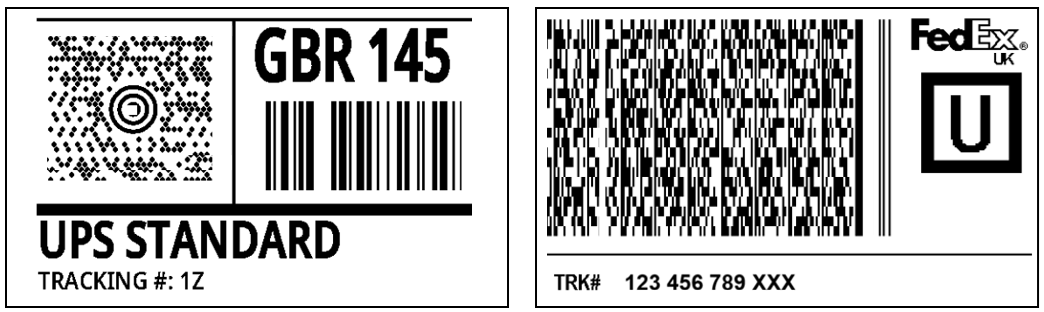
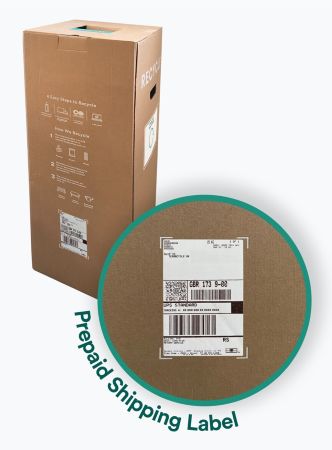
If the shipping label on your box is from UPS, please follow the below steps:
When full, please seal the box and send it back to us by using the prepaid shipping label that is fixed at the back of the box.
First, go to the UPS website, select the 'use classic app' button, and then follow the instructions (see steps below) to complete scheduling your collection.
Section 1 – Shipping Label Questions
Enter the tracking number(s) for each Zero Waste Box to be collected.
Note: The tracking number starts with the number 1, followed by the letter Z: "1Z". Add the tracking number without any spaces.
Section 2 – Collection Information and Location
Fill out all the mandatory fields in this section.
Section 3 – Service and Package Information
A. Select the number of boxes to be collected in ‘Packages in Your Collection’.
B. Enter the total weight of all boxes together. The maximum weight per box is as follows:
- Small box: 7kg
- Medium box: 15kg
- Large box: 25kg
Weights may vary depending on the waste stream you're recycling. It's not required to meet the max weight limit to ship your box, but you cannot exceed it.
C. ‘UPS Services in Your Collection’: always choose ‘UPS Standard’ in ‘UPS Domestic Service section’.
D. Leave empty ‘UPS International Services’ and ‘UPS EU Transport Services’.
E. Tick ‘No’ to the question: ‘Does your collection contain items that weigh more than 32 kg?’
Section 4 – Collection Date and Time
A. Select the date and time slot you’d like to have your products and packaging collected. Please ensure you organise a collection at least 24 hours in advance.
B. Please also ensure there are 6 hours between the earliest and latest times of collection.
C. Select your ‘Preferred Collection Location’ (i.e. your building entrance or reception).
D. Collection Reference: insert ‘Zero Waste Box’ here.
Section 5 – Collection Notifications
Please make sure to unhide this section and enter your email address to receive a confirmation email of your collection.
Please keep the collection number somewhere safe and refer to it whenever you need
to contact TerraCycle®. Click ‘NEXT’ to review the details of your collection request.
Section 6 – Review your Collection Request
Verify all the details of your request and if everything looks good click ‘NEXT’. You should
receive a confirmation email to confirm that your request has been processed.
You will need the Collection Request Number to cancel, modify or track the status of your collection.
Returning with FedEx - step-by-step
If the shipping label on your box is from FedEx, please follow the below steps:
When full, please seal the box and send it back to TerraCycle by using the prepaid shipping label that is fixed at the back of the box. You can organise the collection by following this procedure online:
1. Go to https://www.fedex.com/en-gb/shipping/schedule-pickup.html
2. Fill in all the relevant fields:
- Choose Drop-off or Collection. Click ‘Let’s start’.
- Enter your 12-digit FedEx tracking number (located in bold at the bottom of your label, under the barcode, no spaces) and the postal code that appears on the ship from section of your shipping label (top left corner).
- On the next page, select ‘arrange a pickup’. The pickup address is automatically filled with your shipping address that appears on the label. If you want a pickup from this address, then review the address, add your contact details and parcel details.
NOTE - If you want a pickup from a different address, please start typing the new address in the line ('ENTER A DIFFERENT ADDRESS'), then add your contact information and parcel details:
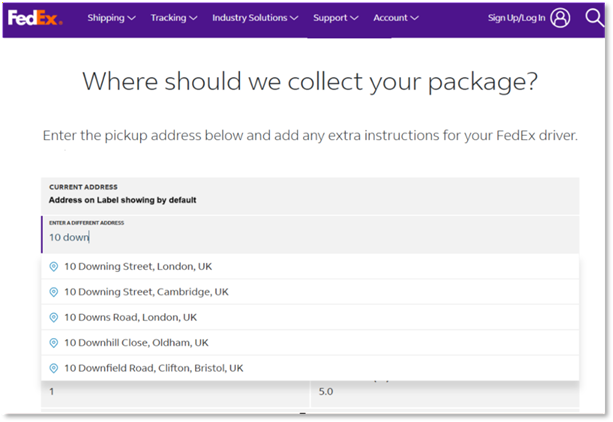
- Choose your collection date/time window and add any instructions (e.g., reception, access code). Please note that you can only request a collection for the same day or the day after. If you need the collection to be organised at a later date, please come back the day before to organise your collection.
3. Accept FedEx Terms & Conditions. Confirm and save/print the confirmation number.
Alternatively, please call FedEx on 03456 070809.
Cut-off times for booking collections:
- Requests before 1:00 p.m. → Same-day pickup (where available)
- Requests after 1:00 p.m. → Next business day (earliest)
Exact times vary by location.
Note: The maximum weight per full box is as follows:
- Small box: 7kg
- Medium box: 15kg
- Large box: 25kg
Waste Transfer Notes for businesses
If you intend to collect waste at commercial premises (e.g. a business, charity, church, or industrial site), you will need to sign an annual waste transfer note before sending your Zero Waste Box™ back to us.
Please note, you do not need to provide a waste transfer note if you collect waste in your Zero Waste Box™ in a non-commercial premises such as your home.
ONLINE ORDERS
If you're a business and purchase your Zero Waste Box(es)™ online, please create an online account and enter your SIC code to receive your waste transfer note. If you are unsure what a SIC code is or need help, please refer to the Companies House website.
ORDERS OUTSIDE OF SHOP
If you're a business and purchase your Zero Waste Box(es)™ outside of the online shop, please fill in this form. Once you’ve submitted your waste transfer note, a copy will automatically be sent to the email you used to fill in the form.
Waste transfer notes are a legally required formality. Simply fill out one waste transfer note per commercial premises, per year, for each type of commercial waste recycled through Zero Waste Box™. Important: If you return a new type of Zero Waste Box™, you will need to submit a new form.
You should keep a copy of your waste transfer note for your own records for two years. If at any time you need to use your waste transfer note, but cannot find it, please contact our Customer Support Team who will be happy to help source a copy for you.
For guidance on EWC codes per Zero Waste Box™, please refer to this guide.
Recycle

Once collected, your products and packaging are sorted and separated by material composition. The separated items are then cleaned, shredded, and made into new recycled products such as outdoor furniture and decking, playgrounds, benches, or watering cans. Click here to learn more about our recycling process.
With your help we can continue to recycle millions of items to preserve valuable resources.
Need to contact us?
For more information regarding your order, please contact us at: customercare@terracycle.co.uk
If you would like to recycle more waste and place a new order, please visit: shop.terracycle.com/en-GB